Be the first to comment
 Soccer Skills 2 World Cup
 Plants vs Zombies Fusion Remake
 Run 2
Run 2 Aqua Bits
 Who's at the Door?
 Speed Master
 Planet Buster
 Steel Legion
 The Coffin of Andy and Leyley
 Jump to the Rhythm of Songs! Musical Ball!
 Skate Dash
 Thief Puzzle
 Friday Night Funkin vs. Hex Mod
 Soccer Skills World Cup
 Friday Night Funkin Corruption: Reimagined!
 A Small World Cup
 Obby: Nuke for Brainrots!
 K-Pop Hunters: Rumi Huntrix vs. Demons
 Stumble Race
 Indoor Soccer
 Sprunki World Online RP - Play with Friends!
 Kick Lucky Block and Get Brainrot Mine-Mobs!
 Sprunki Simon's Realm
 Dreadhead Parkour
 Beast Clash
 Dummies World Cup
 Thorn And Balloons
 Rotate Rush
 Plants vs Zombies
 The Man from the Window
 Red and Blue leader 2
 Scary Shawarma Kiosk: The Anomaly
 Love Tester
 Poppy Playtime: Chapter 5
 Car Crash Sandbox 3D
 Duo DefenseHot
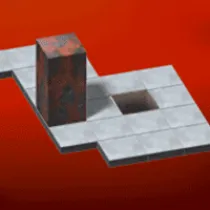
Bloxorz is a block-pushing game, sounds simple right? This game will challenge your intelligence and make you think harder than you think. With 33 levels, complete them all to prove how smart you are!
The aim of the game is to get the block to fall into the square hole at the end of each stage.Be careful not to fall off the edges - the level will be restarted if this happens. Bridges and switches are located in many levels. The switches are activated when they are pressed down by the block. You don’t need to stay resting on the switch to keep bridges closed.
There are two types of switches: “Heavy” X-shaped ones and “Soft” round ones. Soft switches are activated when any part of your block presses it. Hard switches require much more pressure, so your block must be standing on its end to activate it. When activated, each switch may behave differently. Some will swap the bridges from open to closed to open each time it is used. Some will only ever make certain bridges open, and activating it again will not make it close.
Green or red coloured squares will flash to indicate which bridges are being operated. Orange tiles are more fragile than the rest of the land. If your block stands up vertically on an orange tile, the tile will give way and your block will fall.
There is a third type of switch shaped like this ( ). It teleports your block to different locations, splitting it into two smaller blocks at the same time. These can be controlled individually and will rejoin into a normal block when both are placed next to each other.
You can select which small block to use at any time by pressing the spacebar. Small blocks can still operate soft switches, but they aren’t big enough to activate heavy switches. Also small blocks cannot go through the exit hole - only a complete block can finish the stage.
Remember the passcode for each stage. It is located in the top right corner. You can skip straight back to each stage later on by going to “Load Stage” in the main menu and entering the 6 digit level code.